Pre-release · v0.38.0
Build a complete techno track in one studio.
Design the sounds, sequence the groove, arrange the energy, mix it and export the finished song, all in one standalone app for electronic music. Start from a preset, or build every sound yourself.
Offline · No external plugins · Editable arrangements · WAV / MP3 / stem export
How it works
From empty project to finished track
One app, start to finish. No bouncing between tools, no plugins to assemble.
Find a sound
Start from 104 factory presets, or patch a voice from scratch in the Sound Designer.
Build the groove
Sequence it on the step grid, with probability, ratchets, micro-timing and per-step parameter locks.
Turn the loop into a track
Draw an energy curve and bake transitions: scenes, drops, fills and risers, all still editable.
Shape & mix it
Per-track effects, sends and routing into a mastered mix that renders the same every time.
Export it
Export WAV / MP3 / OGG, per-track stems, or MIDI.
Made to get out of your way
Easy to start, deep when you want it
Open it for the first time and it offers to show you around, build your first song with you, or switch to a simpler view. One press each, and nothing runs until you say so. The full studio is there from the start; nothing is dumbed down, and nothing is in your way.
A simpler view when you want it
Prefer fewer controls to start? A simpler view holds just the handful a first song needs. The app offers it on the first launch, and you can switch either way whenever you like, with every panel coming back exactly as you left it.
The app shows you around
A guided tour steps through the window one card at a time, each pointing to the real control it names. Re-run it any time from Help ▸ Tour: a short one for the simple view, a full one for everything else.
Press Play and it's there
No wait for sound. The song starts the instant you press Play, every time after the first. Pause cuts dead, resume is seamless.
A blank canvas
A new song starts empty, with no tracks to delete first and one obvious way to add your first one.
Hear a preset first
Audition any preset through the track's real engine before you commit. There is no apply and nothing to undo, and the inspector always says what your track is on.
Drops you can move
Drag a drop along its lane or type where it goes. Every drop mode has its own lettered, colour-coded chip, so the arrangement reads at a glance.
Your own track groups
Organise the track list your way: you make the groups, name them, fill them and reorder them. They save with the song, and every change undoes by name.
Made for everyone
Full keyboard control with a visible focus ring, screen-reader support end to end, and a single zoom from 75% to 150% that scales the whole interface, menus, dropdowns and pop-ups included.
Help where you are
Press F1 in any window and the manual opens on that window's chapter; Shift+F1 brings the keyboard cheat sheet, and a ? button sits in every title bar. No hunting through contents pages mid-idea.
It remembers your workspace
Every tool window opens where you left it, at the size you left it. Escape closes any of them, the active window is always obvious, and Tools ▸ Preferences is the one plain home for the settings that need one.
Live input
Play your tracks from a MIDI keyboard
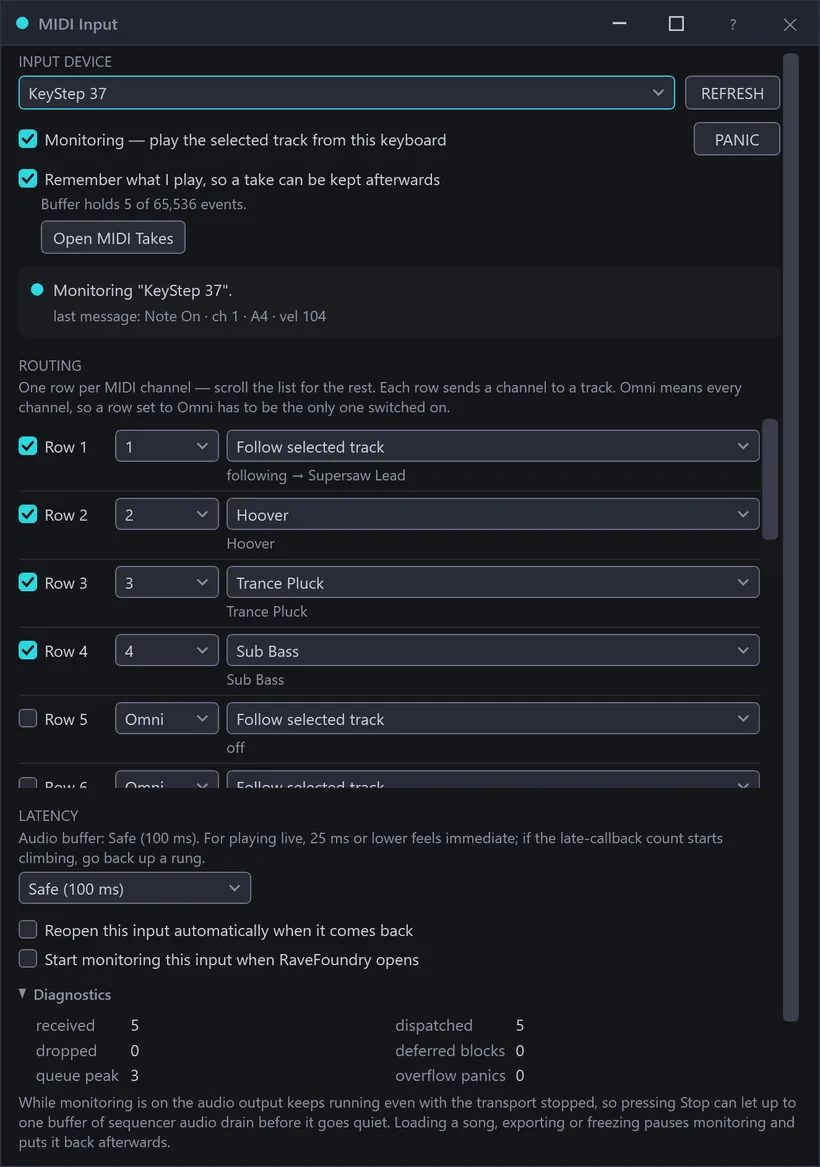
Plug in a class-compliant MIDI controller, open Tools ▸ MIDI Input, tick Monitoring, and the selected track plays under your hands, with the transport stopped or running, held chords and all.
- Sixteen channels, sixteen tracks. A MIDI channel is an instrument. Route up to sixteen of them to sixteen different melodic tracks at once, or let one row follow whichever track you've selected.
- PANIC is always there. One button releases every live note on every track, and it is never greyed out. Your sustain pedal and All-Notes-Off are honoured too.
- Latency you can see. Extra-low buffer settings are on hand for playing live, with an honest late-callback counter that tells you the moment your machine can't hold one.
- Play it, then keep it. While you monitor, RaveFoundry remembers the last stretch of your playing, so when a run comes out right, open Tools ▸ MIDI Takes, hear it back, and drop it onto a track as ordinary editable steps. Monitoring on its own still writes nothing; only the drop does.
- Or arm a track and record. New in v0.32: an R on each mixer strip arms a track, and a record pass writes what you play straight into its pattern, with quantize, replace-or-layer, punch-in/out and a count-in, all in Tools ▸ MIDI Record. Arms last the session; a saved song never re-opens armed.
- Map your controller to the app. With MIDI Learn, click a target and move a knob, fader or pad, and that control drives it: a rack parameter, a track macro, mute/solo or the transport. Maps follow the controller between projects, or save with the song. (RaveFoundry reads your controller; it doesn't drive it back.)
New · Experimental
Match a sample to your synths
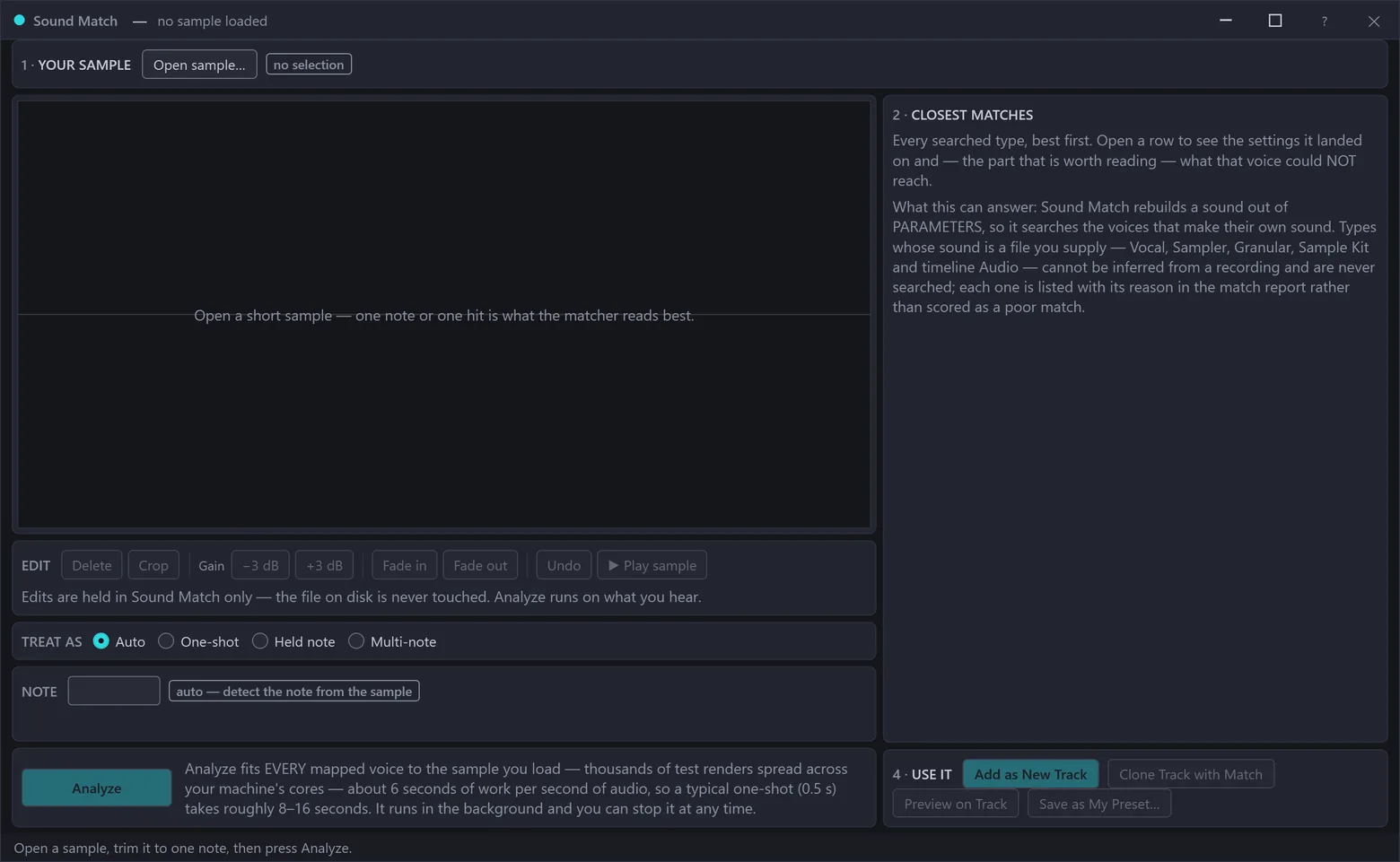
Drop in a short sample (a kick, a stab, a pad, one note of anything) and RaveFoundry fits every one of its own synth voices to it, then ranks them all in one list, best first, by how close each got. Each row wears a coloured band beside its word: Excellent, Strong, Fair, Weak, or a receding grey when a voice can't reach your sample. The shape of the answer reads at a glance, with the word and the percentage always beside it. Open a match to see the settings it landed on and what it couldn't reach, preview any of them, re-run the search on just one voice, or ask the Sound Library which of your own presets already lands close to the winner's settings. Then take it three ways: add it as a fresh track, save it as your preset, or clone it straight onto your own pattern, a new track that plays your steps with the matched sound while the original stays untouched. A preview lets you hear the swap in the mix before you keep it. While it works, the panel tells you how long is left, and your sample and ranking are still there after a restart, so a long fit is never lost with the session. You can feed it from anywhere: open a file, or send audio straight from the Audio Lab. The panel also states plainly what it can and cannot answer, and every answer is RaveFoundry's own synthesis, with no sample library and no machine learning.
Why it's different
A rave tool built like a precision instrument
All the fun of techno, on foundations you can trust. What you make is reproducible, self-contained and yours.
Exports that repeat
Render the same song twice and you get the same audio, on any machine, on any day. Reliable stems, mixes you can trust, and a project that sounds the way you left it.
Fully self-contained
No external plugins, no cloud dependencies, no licensing traps. Songs carry their own samples. What you make is yours, end to end.
Works offline, opens forever
The whole studio runs on your machine. No account, no cloud, no online checks. Your projects stay self-contained and open the same years from now.
Inside the studio
See it in action
A few looks at RaveFoundry in use. Click any shot to view it full size.
What's inside
Core features
Everything below ships in the current build. Each block is a working part of the studio, not a roadmap promise.
Instruments & synthesis
Drum voices
Punchy kicks with a tighter, deeper low end and full pitch and click shaping, plus snares, claps, hats, toms, ride and crash.
Percussion set
Modelled shaker, cowbell, rimshot, clave, conga and tambourine, reference-true percussion for fuller grooves.
Bass & lead
Sub bass, FM bass and mono leads, with hard-sync for aggressive timbres, plus a diode-ladder acid filter and a real per-step accent on the bass.
Keys, chords & pluck
FM keys, a chord engine that holds up to six notes, and a plucked-string / harp voice, with body, pick-noise and excitation character for anything from harp to nylon.
Organ
A drawbar organ with classic tonewheel-organ tones and its own factory presets.
FM Synth
A true FM synth: deep, punchy bells, e-pianos and metallic leads the simpler synths can't reach.
Wavetable
A morphing wavetable synth for evolving leads and pads.
Granular
A granular voice. Scrub through a sample as a shifting cloud of grains.
Sampler
One-shot per step with start, fine-tune, reverse, loop and AR envelope.
Sample Kit
A zoned drum-sampler track with velocity layers, choke groups, and one-click auto-slice to chop any loop straight into playable pads.
Filter modes & velocity
Filter modes (low / high / band / notch) on the subtractive synths, plus velocity routed to cutoff or decay with drawable velocity curves.
Envelope shaping
Per-stage curve shaping (soft to sharp) and a second envelope across the melodic voices (pitch and cutoff gestures on the subtractive synths, the wavetable's morph and more) for swells and evolving timbres.
Preset library
104 sound presets across the track types, instant playable starting sounds, plus your own saveable user bank. Factory presets stay protected.
Forge Body: the struck-body instrument
A physically-modeled struck-body voice: free bar, steel plate, bell, membrane drum, woodblock, steelpan, and now a tuned Marimba and Glockenspiel. Struck metal, wood and skin, modeled, not sampled.
Sound Designer
A dedicated workspace to patch any voice with live audition, spectral analysis and a one-click preset strip. Audition, tweak and save your own presets as you go.
Sequencing & modulation
Ratchets up to ×8, per-step probability, micro-timing, conditional triggers, per-track swing and note pools.
On any melodic track, every note sprouts a branching tree of new notes, played by the track's own voice. An arp that grows rather than cycles, and it weaves the same way on every loop and every export.
Type tracker-style patterns straight onto a track: x…X..7 | x..o, note names with ~ ties and (…)×N repeats. Any pattern copies back out as text.
Per-track automation lanes, and step parameter locks on every parameter of every track type, audio and vocal tracks included.
Write melodies where the melody is. A piano-roll-style pitch grid for the melodic voices, sharing the same steps, locks and automation as the drum grid.
Arbitrary, tempo-synced modulation shapes you draw yourself.
Four macros per track, each fanning out to many parameters at once.
Draw / erase / velocity tools, copy-cut-paste that now pastes onto any track, rotate / mirror / invert, Euclidean fills, roll & accent builders.
Timing and velocity variation with reproducible "freeze" so a groove renders identically.
Named states you can capture and recall while writing.
A consolidated per-step authoring surface: a lane strip beneath the grid plus a Step Detail Matrix for velocity, conditions and parameter locks, all in one place.
Each track can read its own grid rate, from 1/8× up to 2×, for half-time hats, double-time arps and polymetric layers over one shared tempo.
Draw the step grid at two sizes: the standard grid, or a large touch-friendly view. You choose from a CELL strip and it is remembered across restarts. Same sixteen steps either way, only the cell changes, and the larger size gives the track-name column its room back.
Import a multi-track .mid as an editable arrangement, setting each track's type and preset before you commit, with a pre-import preview. Export your song as General MIDI: drums on channel 10, chords kept intact, and each melodic voice on its own channel with its instrument. A file's mod-wheel and expression moves can now come in as automation curves, one lane at a time, and your Tempo Map writes out with the file and round-trips back unchanged.
Mixing & mastering
- Effects Rack
- A device chain on every track, with twenty-two native devices. They run from a compressor, a saturator, a lookahead limiter, a state-variable filter and a transient shaper to plate, room and warehouse reverbs (the newest a real feedback-delay-network space whose decay is set in honest seconds), chorus, a phaser, pitch and frequency shifters, a spectral freeze and a granular texture, plus a Rumble Generator that lays a tuned sub tail under your kick. Reorder them, or split the rack into parallel branches: a band split with adjustable crossovers, or a dry/wet pair, edited in place with per-branch gain. Step-lock, automate, macro or modulate every knob, with a modulation matrix of LFOs, random sources and an envelope follower, and a live indicator on every control showing what's moving it. Tracks group onto buses, and a group bus now carries an editable rack of its own: the same twenty-two devices, added, reordered and split into parallel branches at group scope (step locks, macros and the modulation matrix stay per-track this release), opened from the gutter or from the group's mixer strip, working on the whole summed bus. One compressor across the drums instead of five. Save any rack you build, a track's or a group's, as a chain, and browse, apply and rename your chains from the Sound Library's Rack Presets tab, all on your own machine.
- Gain Shaper: sidechain pumping
- Pull a track's level down on a trigger and let a drawn curve bring it back. The trigger can be another track's notes (even a muted ghost track), a beat division, or an audio threshold that listens to the sound itself. Classic Pump is a one-click preset, beat-synced shapes stay locked to the beat when the tempo moves, and it adds zero latency.
- Surgical EQ
- An eight-band parametric EQ on every track, drawn straight onto its curve with labelled axes, typed values and a pop-out view. It now has per-band solo to hear exactly what a band sits on, and a mid/side mode per band that acts on the centre or the width alone. Each band is drawn as the shape it really is: low-pass and high-pass nodes carry a miniature of their own response, notch, band-pass and all-pass wear their own marks, the readout leads with the shape and the type picker explains each one in a sentence. Save a curve to a file and load it onto any track or the master, or copy one straight from track to track, one undo either way. The same tool sits across the whole mix on the master bus, with a live Analyze of the output; both open from the menus as well as the inspector. Automatable as a block.
- Send buses
- Shared delay and reverb sends fed by per-track send gains, and by each group bus's own pair now that the groups have mixer strips to set them from.
- Fractal Echo
- A third send: recursive echoes of echoes, with depth, branch, spread and tone, from cathedral tails to rhythmic lattices.
- Mixer
- All-track levels, pans, mutes and solos with live metering. Solo sits on the track rows too, the same state in both places, live mid-playback. Your groups stand as strips of their own beside MASTER, each with a fader, mute, solo, its reverb and delay sends and a button through to its rack. Every fader reads its level in decibels at rest and drags linear-in-dB like a console, unity at three-quarters of the throw, silence at the bottom. The right-click entry takes a dB value typed straight in:
-6, or-inffor silence. Each MIDI strip carries a record-arm R beside mute and solo. The four per-track sends fold behind one control so the faders stay lined up, and each strip's menu jumps to that track's EQ or rack. Opens from Tools, alongside every other tool window. - Master dynamics
- Bus compression and limiting on the master stage.
- MasterLab
- Offline spectral and loudness analysis of the finished mix, a live EBU loudness and true-peak meter while it plays, and a loudness-range figure on every export.
- Bake to master
- Turn MasterLab's reference-match analysis into a corrective master, with gain + shelf tilt baked into the master params. Deterministic, so exports repeat exactly.
- Strip utilities everywhere
- The channel-strip utilities (gate / expander, transient shaper, stereo width, exciter, phase / polarity) now run on every track type, not just vocals.
- Multiband dynamics
- A 3-band downward multiband compressor on every track: de-boom a bass, de-harsh a lead. Automatable and parameter-lockable.
- Multiband saturation
- A 3-band saturation insert per track: warm the lows, bite the mids, air the highs.
- Resonator bank
- Six tuned resonators per track for struck-body character and singing tails.
- Export
- Full song to WAV, MP3 or OGG Vorbis at any length, streamed straight out with no size ceiling, or per-track stems rendered in parallel, each in the format you chose for it. Cancel at any point, Escape included, and the disk is left exactly as it was: every format writes beside its target and moves into place only on a clean finish, so an abandoned bounce can't land on top of a good one. Queue several deliverables, WAV 24-bit and MP3 320 say, and the rows that agree on everything the renderer hears share a single render, named by one Save dialog. The quality checks read the whole file, stems included, and tell you plainly what they found. Each export gets a QC report beside it, with the path, the finding and the export count shown when it finishes. WAV, OGG and MP3 files all carry title, artist and BPM. And once you approve an export as your reference take, every later export is measured against it and the report says exactly what drifted, or why a figure honestly cannot be compared.
Arrangement & energy
Energy Curve Arranger
Draw a 0 → 1 intensity curve across the song and it stamps the arrangement to match: track density, drops and risers, fills and filter moves.
Transition Baker
One action stamps a full transition at a bar boundary: riser + comeback, snare-roll fill, filter-open sweep. Audition, then keep. One undo.
Pattern / Scene arranger
Block- and scene-level arrangement that compiles down to the flat timeline. Build patterns and sequence them as scenes, with folding and grouping. Convert a finished song into patterns that cut at your drops: readable sections, not anonymous 8-bar tiles.
A/B versions
Capture the whole song as versions and A/B-switch between them mid-playback with no reload, plus a plain-text diff of what changed.
Tempo Map
Change tempo mid-song: stepped BPM changes at any bar, for the half-time breakdown or the second-half lift. Everything synced follows, and it still renders identically.
Pattern Variation
Ask for a handful of alternatives under plain constraints, like "keep the kick, 15% busier" or "percussion only". Hear any candidate with one ▶ before it costs you a take, A/B the ones you're weighing up, and keep the one you like. Tick what has to stay put on a checklist (whole tracks, sound types, or a single dimension like rhythm or pitch) and ask for more like the candidate that nearly worked. Every candidate is graded and shows exactly what changed, down to a line pricing the edit before you apply it. It is deterministic, varies your own material, and learns nothing. One undo reverses it.
Plus the essentials: beat drops, now with an endless-climb Shepard-riser drop mode · auto-arrange scaffolding · "new from style" templates · groove models for humanised timing.
Foundation & reliability
Your projects stay reproducible: the same song renders the same on any machine, a song bundle carries the song and its audio as one file, and it all works offline, with unlimited undo, autosave and crash recovery. Every step in a song file writes only what makes it different, so a song lands about a quarter of the size it used to and plays back exactly the same.
A routable studio
Audio Lab
One unified design-and-edit workspace for destructive sample editing (trim, gain, fade, normalize, reverse, de-click, slice-to-sampler) with a dedicated neutral Audio track type for loops, recordings and bounces. Bake an edit back to a clip and it keeps its original: one click in the inspector reverts it.
Sound Library
A browsable, searchable, auditionable repository of samples and track presets. Apply a preset in one undo, or drag it to its target, with device-free auditions. Save the rack you built on a track or a group as a chain, then browse, apply and rename your chains from the new Rack Presets tab, all on your own machine. Find similar re-orders the library by how a sound actually sounds, on-device. Point it at any folder you like, preview a content pack before you let it in, and share your own as one file that carries its own licence guard, so nothing arrives unattributed.
Cross-track routing
Route one track's audio into another, up to 16 routes, feeding a live channel vocoder and spectral morphing, so a vocal or drum bus can literally speak or recolour another track.
Resynth Wavetable
Turn any audio into a playable, band-limited wavetable bank. Your own recordings become an instrument.
Built for vocals
A full vocal studio, built in
Record or import a vocal and get a complete channel strip plus a deep creative and spectral suite, the kind of chain most DAWs need a rack of plugins for. Over 50 automatable parameters end to end, each one deterministic and repeatable like the rest of the engine, and drivable by automation lanes, macros and curve-LFOs.
Channel strip
High-pass · gate & expander · compressor · de-esser · transient shaper · drive.
Pitch & character
Pitch-shift up or down (octaves + fine tune) · formant-preserving hard-tune · shimmer for octave-up sparkle · doubler · exciter.
Hard-tune
Transparent-to-robotic pitch correction, with key and scale readouts, formant preserve, and an expression-preserve dial that fixes the note while keeping your vibrato and scoops.
Spectral resynthesis
Freeze · smear · formant-shift · robot · whisper, on a custom spectral engine, latency-compensated.
Modulation
Chorus · flanger · phaser · frequency-shifter · ring mod.
Creative mangling
Chop · stutter · granular texture · lo-fi crush.
Space & time
Ping-pong delay · gated reverb · stereo width · polarity · clip time-stretch.
Future Shadow
Pre-echo ghosts: anticipation echoes (echo, reverse, or a whispered pre-voice) that land right on your phrase's onsets and share its reverb space. The drop hears you coming.
Vocoder
Classic talk-box / robot-voice carrier for a vocoded lead, plus a cross-track spectral vocoder that bakes one track's spectral envelope onto another.
In the box
Thirteen songs in the box
A pack of finished demo songs ships with the app. Open any of them from File ▸ Open Demo and pull the whole arrangement, sounds and mix apart to see how it's built. Thirteen finished tracks, from acid and hard techno to melodic and neuro: real productions, not loops.
Pairs with the 10 refreshed "new from style" starter templates, a running start in the flavour you're after.
Learn it in the app
A manual that ships with the app
Everything you need to get to sound is built in. No network, no account, no tab-hunting.
A full manual, offline
Nineteen chapters from first beat to troubleshooting, with real screenshots of the app, bundled and searchable, no connection required. It opens by saying what RaveFoundry needs from your PC: Windows 11 64-bit, 4 cores, 8 GB RAM, a 1920 × 1080 display and 500 MB free at minimum; 8 cores or more, 16 GB and a 2K or 4K display recommended.
Guided walkthroughs
An on-screen tour points an arrow at each control as it names it, with written walkthroughs for your first beat and your first song. Re-run the tour any time from Help ▸ Tour.
Press Shift+F1 anywhere
A one-page keyboard-and-gesture cheat-sheet, always a keystroke away.
A reference that can't drift
The parameter tables are generated from the engine itself, so the docs can't fall out of sync with the sound.